


Getting Started with Trustline
Go from a new account to your first underwritten transaction: register, complete KYB, create a sandbox API key, and submit to Trustline.
Trustline is a live platform you can use today at portal.t54.ai: create an account, complete onboarding, and submit a transaction for underwriting against the same API that backs production. This page walks the full path from a new account to your first underwritten transaction.
Trustline serves two audiences, and both follow the same onboarding ladder. The difference is what you do once you have a working integration, not how you get there. Sandbox is self-serve and usable immediately; production requires approved KYB and production enablement by the Trustline team after a launch review.
Who Trustline Is For
Institutions and platforms running AI agents — treasury, trading, and payment-operations teams — adopt Trustline to keep agent-initiated transactions inside a defined risk boundary while preserving the governance and compliance evidence a serious financial program requires. For this audience, onboarding is also a governance exercise: completing KYB, inviting a team with role-based access, and reviewing the audit and compliance evidence behind each decision.
Agent developers integrate the assessment API directly. For this audience, onboarding is the path to a sandbox API key and a first call to the async underwriting endpoint, followed by the polling loop and webhook wiring that surface a decision. Both audiences are KYB-gated for production, and neither is intended for ordinary end consumers to use directly — the consumer is the principal behind an agent, not a Trustline account holder.
The Onboarding Ladder
The portal presents a guided checklist on the Overview page that tracks each step below until your organization is production-ready. The ladder is the same for both audiences.
- Create an account and verify your email. Sign up with an email and password. Trustline sends a verification link, and you must verify your email before you can log in.
- Create an organization — you become its first owner. Set a human-readable
nameand a unique lowercaseslug. New organizations start withkyb_statusatnot_started,sandbox_enabledtrue, andproduction_enabledfalse. - Complete KYB (Know Your Business). Save your business profile as a draft, attach supporting documents, and submit for review. KYB moves
not_started -> draft -> submitted -> in_review -> approved | rejected | expired. If KYB is rejected or expires, correct the information and resubmit. - Invite your team with role-based access. Invite teammates by email and role:
owner,admin,developer,compliance, andviewer. Each invitation is a one-time email link that expires after seven days. - Review sandbox configuration. On the Configuration page, set environment defaults before generating traffic, including default metadata, Agentic Challenge preferences, allowed origins, and IP allowlists. Configuration is stored separately per environment.
- Create a sandbox API key. Create a
sandboxkey on the API Keys page. Keys take the formtl_sandbox_{key_id}.{secret}, the default scope isunderwriting:write, and the raw key is shown exactly once at creation — store it in your secret manager immediately. - Add a webhook endpoint and send a signed test event. Register an endpoint URL on the Webhooks page and send a signed test event from the portal before relying on live webhook state. Localhost and private-network URLs are rejected in every environment.
- Submit your first transaction. Use your sandbox key to call
POST /api/v1/validation/assess-async, then poll the returnedpoll_urluntil the transaction reaches a terminal status. - Review compliance evidence. Inspect the audit trace, signature summary, evidence manifest, retention summary, and safe decision explanations for the transaction.
- Move to production. Once KYB is approved and the Trustline team enables production after launch review, create a production key, register an HTTPS production endpoint if you use webhooks, and re-verify configuration in the production environment.
Each step maps to a page in the portal:
| Ladder step | Portal page |
|---|---|
| 1. Create an account and verify your email | Sign-up and email verification |
| 2. Create an organization | Organization |
| 3. Complete KYB | KYB |
| 4. Invite your team | Team |
| 5. Review sandbox configuration | Configuration |
| 6. Create a sandbox API key | API Keys |
| 7. Add a webhook endpoint and send a test event | Webhooks |
| 8. Submit your first transaction | Transactions and Request logs |
| 9. Review compliance evidence | Transaction audit and compliance views |
| 10. Move to production | Overview (production readiness) |
The portal pages and their roles are mapped in The Developer Portal; the full, always-current reference lives inside the portal itself once you sign in.
Sandbox vs Production
Trustline runs two customer environments under one organization, membership, and KYB model. Sandbox and production share the base URL https://portal.t54.ai/api/v1; your environment-scoped API key selects the environment. The two environments differ in how access is granted.
| Sandbox | Production | |
|---|---|---|
| Availability | Self-serve today, usable immediately | Enabled by the Trustline team after launch review |
| KYB requirement | None to start — create sandbox keys and submit before KYB is approved | Approved KYB is required |
| Additional gate | None | Production enablement by the Trustline team, after a launch review |
| Key prefix | tl_sandbox_ | tl_production_ |
| Webhook endpoints | HTTP or HTTPS, for controlled testing | HTTPS only |
Approved KYB alone does not unlock production. Production access requires both approved KYB and explicit production enablement by the Trustline team after the launch review. Sandbox readiness is not production readiness — re-verify keys, webhook endpoints, and configuration in the production environment before going live.
What Happens When You Submit
Submission is a single call to the async underwriting endpoint with your transaction details and the agent's reasoning context. The endpoint accepts the submission immediately and returns a pending transaction with a trustline_transaction_id and a poll_url.
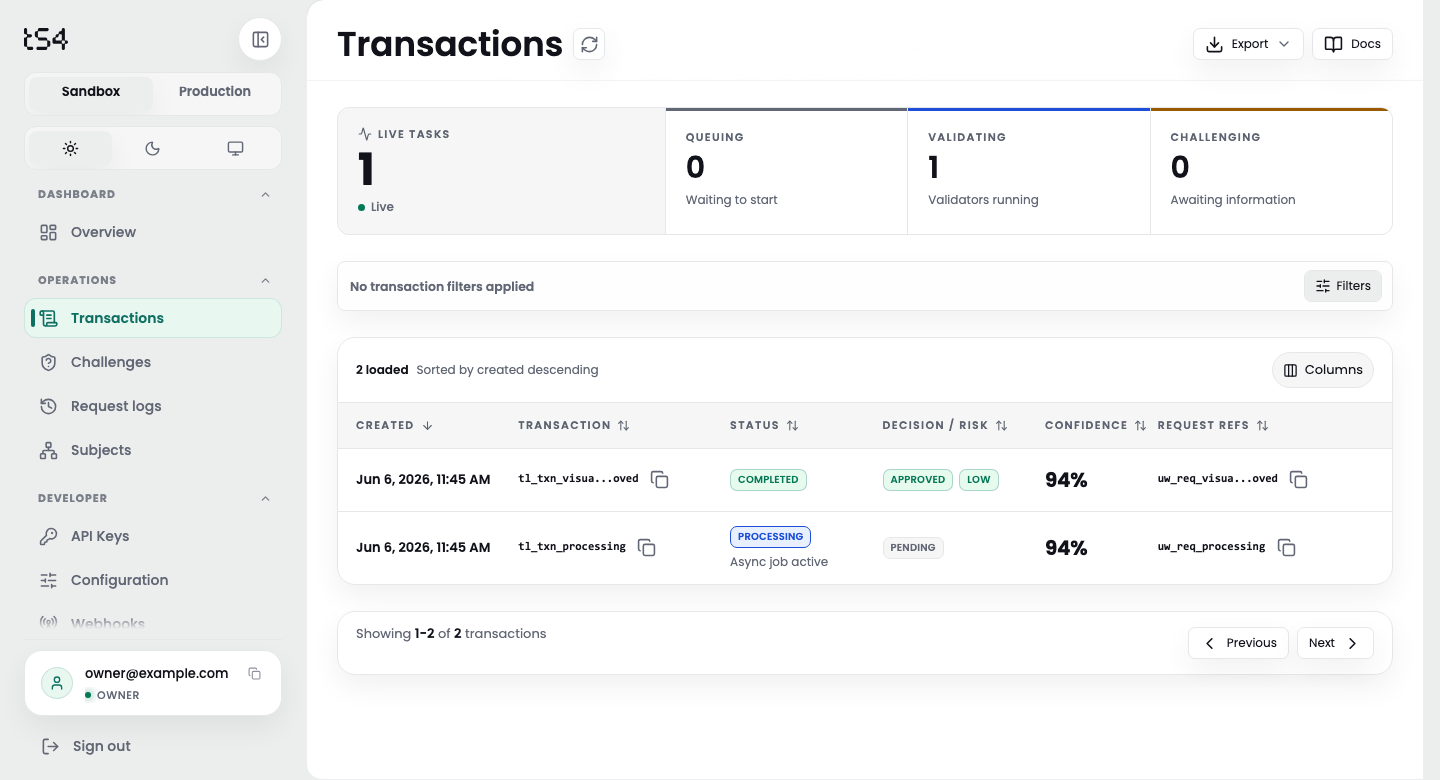
After you submit, the transaction appears in the portal with its decision, risk level, confidence, and status. Sample data.
export TRUSTLINE_API_KEY="tl_sandbox_..."   # created in the portal

curl -sS -X POST "https://portal.t54.ai/api/v1/validation/assess-async" \
  -H "Authorization: Bearer $TRUSTLINE_API_KEY" \
  -H "Content-Type: application/json" \
  -H "Idempotency-Key: $(uuidgen)" \
  -d '{
    "assessment_type": "transaction",
    "agent_id": "agent_quickstart_001",
    "transaction_data": {
      "transaction": {
        "transaction_id": "tx_quickstart_001",
        "amount": 25.0,
        "currency": "USD",
        "chain": "base",
        "recipient": "https://merchant.example/pay"
      },
      "audit_context": {
        "current_task": "Pay the merchant invoice for completed work.",
        "reasoning_process": "The user authorized this purchase and the amount matches the invoice."
      }
    },
    "metadata": {"source": "x402_secure", "environment": "sandbox"}
  }'
The response carries the identifiers you need to track the transaction:
{
  "schema_version": "underwriting_async_submission.v1",
  "status": "pending",
  "trustline_transaction_id": "tl_txn_...",
  "poll_url": "/api/v1/underwriting/transactions/tl_txn_...",
  "retry_after_seconds": 3
}
Poll the poll_url until the transaction reaches a terminal status, waiting retry_after_seconds between calls. On a completed transaction, decision is APPROVE or DECLINE, accompanied by risk_level, confidence, and the reasons behind the result. When evidence is insufficient rather than the risk being clear, Trustline pauses the transaction in the requires_information status and issues an Agentic Challenge — asking the agent for the specific information it needs — instead of declining outright. The full submit, poll, and challenge contract is covered in Async Underwriting API and Agentic Challenge.
Next Steps
- The Developer Portal — onboarding and a page-by-page reference for organization, team, KYB, keys, and configuration.
- Async Underwriting API — the full submit, poll, and decision contract.
- Agentic Challenge — how a paused transaction asks for missing information and reassesses.
- Webhooks & Monitoring — signed events, the polling loop, and the monitoring model.
- Compliance & Audit — audit-chain verification, signature summaries, and evidence exports.